






How to Instantly Create Accurate Barcodes for Free with Axevora’s Online Barcode Generator

Why a Free Online Barcode Generator Matters in Modern Workflows
In today’s hyper‑connected marketplace, every product, asset, or document often needs a scannable identifier. Traditional barcode software can be pricey, require installations, and lock you into a specific ecosystem. A browser‑based solution like Axevora’s Barcode Generator eliminates those barriers, letting anyone—from a small‑business owner to a university student—produce standards‑compliant barcodes in seconds.
What the Barcode Generator Does
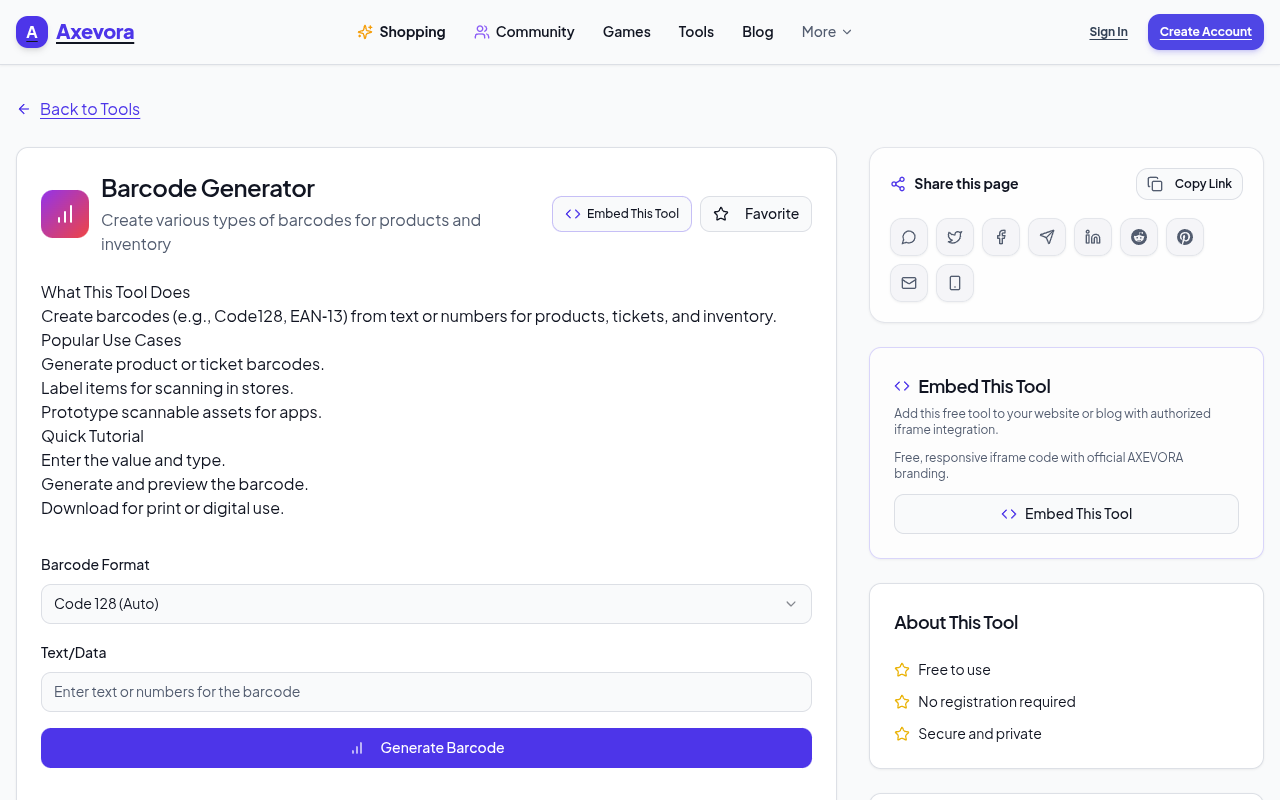
Axevora’s tool creates a wide range of barcode symbologies (UPC, EAN, Code 128, QR, DataMatrix, and more) directly in your web browser. You simply input the data string, select the format, tweak size or color options, and the generator renders a high‑resolution PNG or SVG that’s ready for printing or embedding.
Who Should Use This Tool
- Small‑business owners needing product labels on a budget.
- Students and educators who want to add QR codes to study materials.
- Developers prototyping inventory‑management apps.
- Warehouse staff creating temporary tags for audits.
- Everyday users looking to encode URLs, contact info, or Wi‑Fi credentials.
Real‑World Use Cases
- Rapid product labeling: Generate UPC‑A codes for a new line of handmade candles and print them on adhesive sheets.
- Event check‑in: Create QR codes linking to a Google Form for attendee registration, then scan them on entry.
- Library inventory: Produce Code 128 tags for books, enabling quick barcode‑based checkout.
- Personal organization: Encode Wi‑Fi passwords in QR codes and stick them on a home router for guest access.
Step‑by‑Step: How to Use the Barcode Generator
- Visit Axevora’s Barcode Generator page.
- Select the desired symbology from the dropdown (e.g., Code 128, QR, EAN‑13).
- Enter the data you want encoded—numbers for product codes, text or URLs for QR codes.
- Adjust optional settings: size, margin, foreground/background colors, and output format (PNG or SVG).
- Click Generate. A preview appears instantly.
- Use the Download button to save the image, or right‑click to copy it directly into a document.
Key Benefits of Using Axevora’s Browser‑Based Generator
- No installation—runs on any modern browser.
- Privacy‑first: Your data never leaves your device; generation happens locally.
- Completely free with no hidden subscription tiers.
- Multi‑format support covering the most common barcode standards.
- High‑resolution output suitable for both print and digital use.
Common Mistakes and How to Avoid Them
- Using the wrong symbology: UPC works only for 12‑digit numeric codes; trying to encode alphanumeric data will produce an error. Choose Code 128 or QR for mixed content.
- Ignoring checksum requirements: Some formats (EAN‑13, UPC‑A) require a valid checksum digit. The tool auto‑calculates it, but only if the length is correct.
- Oversizing for small labels: Large dimensions look great on screen but may not fit on 1‑inch labels. Test with a small size first.
- Saving in the wrong format: PNG is raster and may blur when scaled; SVG retains crisp edges for any size.
Practical Examples & Sample Workflows
Example 1 – Small‑Batch Product Launch
- List product SKUs in a spreadsheet.
- Copy a SKU, select Code 128, generate the barcode, and export as SVG.
- Import the SVG into your label‑design software (e.g., Canva) and batch‑print.
Example 2 – Classroom QR Resources
- Generate a QR code for each supplemental video link.
- Print a 2 × 2 cm sticker and attach it to the corresponding worksheet.
- Students scan with any smartphone to instantly access the resource.
Frequently Asked Questions
- Is there a limit to how many barcodes I can generate?
- No. The tool is unlimited for personal and commercial use, as long as you stay within normal browser session limits.
- Can I generate barcodes offline?
- Yes. Because the generation runs client‑side, you can use the page without an active internet connection after the initial load.
- What barcode standards are supported?
- UPC‑A, UPC‑E, EAN‑13, EAN‑8, Code 39, Code 128, ITF, QR, DataMatrix, and more—see the dropdown for the full list.
- Do I need an account to download the images?
- No. The download button appears immediately after generation; no sign‑up is required.
Verdict & Call to Action
Axevora’s free Barcode Generator delivers professional‑grade barcodes in a few clicks, removing the cost and friction of traditional software. Whether you’re labeling inventory, creating QR‑linked learning materials, or just experimenting with data encoding, this tool is a productivity staple.
Ready to streamline your workflow? Try the free Barcode Generator on Axevora →
 50000
 20000
 20
 20
Explore Related TITTOO Coverage & Discussions
- [Category Hub]: Technology & AI Hub
- [Community Forum]: Technology & AI Discussion Forum
- [Related Editorial Story]: Career & Finance Horoscope, October 13, 2026: Turning New Workplace Ideas Into Real Progress
- [About & Standards]: TITTOO Editorial Standards & Methodology
Discover the fastest way to generate product‑ready barcodes without installing software. This step‑by‑step guide shows you how to use Axevora’s free Barcode Generator to boost inventory accuracy and streamline digital workflows.
Read the full article ↓Discover the fastest way to generate product‑ready barcodes without installing software. This step‑by‑step guide shows you how to use Axevora’s free Barcode Generator to boost inventory accuracy and streamline digital workflows.
Yeh quick view original article ke excerpt par based hai. Puri details ke liye Standard Deep mode padhein.
You are reading the original TITTOO article. Existing article text, links, images, and embedded media are preserved.