JPG to PDF: How to Combine Multiple Images into a Single PDF Online for Free
Why Converting JPG to PDF Matters in Modern Digital Workflows
In our daily personal and professional routines, image files pile up fast. Whether you are photographing physical receipts for an expense report, snapping textbook pages for a study group, or digitizing signed contracts, you often end up with a cluttered folder of individual JPG files. Sending twenty separate image attachments across email or messaging apps creates chaos for both sender and recipient.
Converting those disconnected picture files into a single, polished PDF document solves this friction immediately. Portable Document Format (PDF) maintains consistent visual formatting across all platforms, enables effortless printing, and dramatically simplifies multi-page document distribution. With Axevora’s browser utility, you can accomplish this transition in seconds without downloading heavyweight software packages.
What Is Axevora’s JPG to PDF Converter?
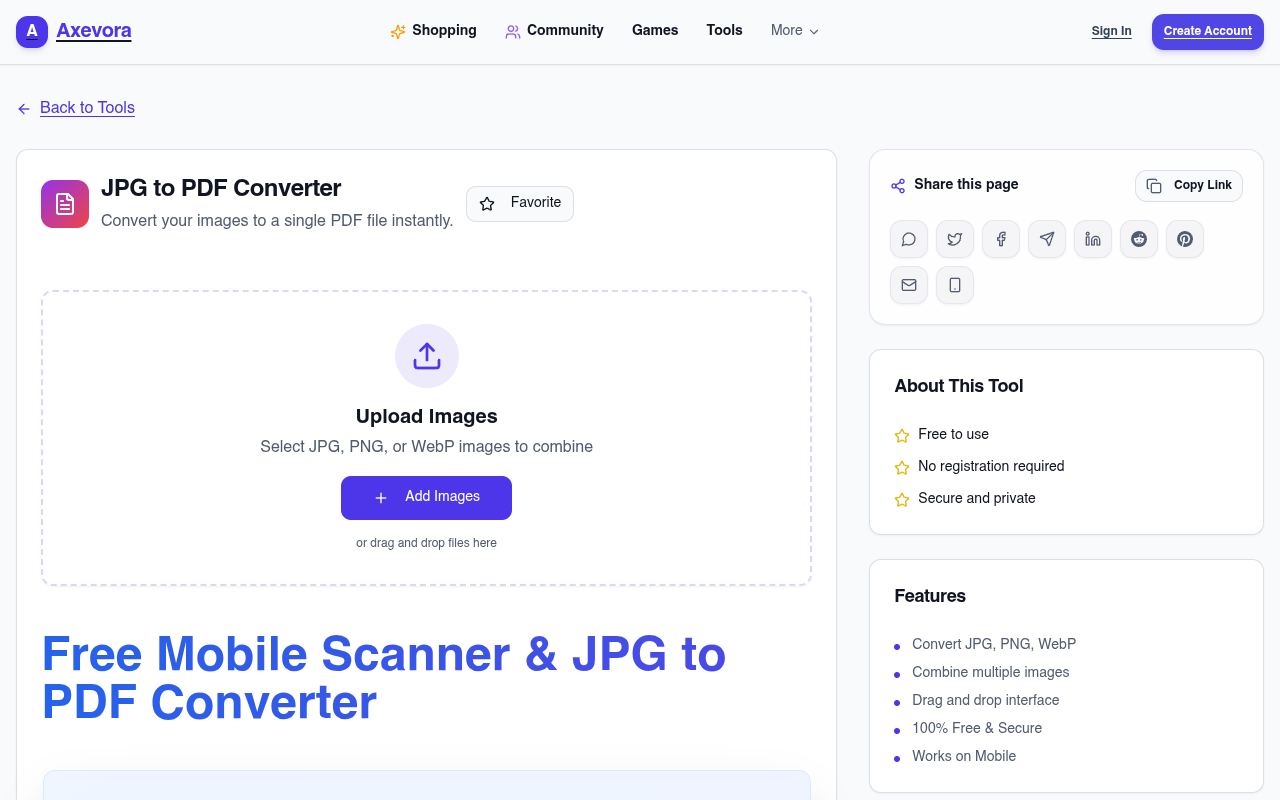
The JPG to PDF utility on Axevora is a lightweight, responsive online tool designed to convert one or several JPG/JPEG images into a unified PDF document. Operating directly inside your modern web browser, the tool parses your image inputs, scales and aligns them sequentially, and bundles them into an industry-standard PDF container. There are no watermarks, hidden paywalls, or forced account registrations—just rapid, straightforward conversion whenever you need it.
Who Should Use This Tool?
- Students and Educators: Consolidate handwritten notes, whiteboards, or homework assignments into one tidy PDF for clean submission on learning portals.
- Business Professionals and Accountants: Merge invoices, bills, and payment receipts into unified monthly audits without purchasing premium software suites.
- Designers and Creators: Assemble rapid visual previews, client moodboards, or sequential draft art into a single review document.
- Remote Teams: Standardize onboarding paperwork, scanned ID documents, and office forms for frictionless internal sharing.
- Everyday Users: Compile memorabilia, family recipes, or medical scans into secure, archivable digital records.
4 Real-World Scenarios Where Combining JPGs Saves Hours
1. Expense and Tax Filing
Rather than uploading dozens of loose receipt photos into corporate expense portals or emailing an unruly bundle to your accountant, you can convert every receipt into a single chronological PDF. This eliminates missing files and ensures speedy approvals.
2. Academic Assignment Submissions
Most university portals enforce strict single-file submission rules. If you take three photos of a handwritten calculus test, merging them into one clear document guarantees you meet grading requirements without formatting glitches.
3. Client Portfolios and Pitch Decks
If you have high-resolution exports of your visual work, sending loose JPG files looks amateurish. Packing them neatly into a single, structured PDF portfolio preserves your visual sequence and offers a smooth reading experience on desktop or mobile.
4. Legal and Real Estate Documentation
Property leases, signed addendums, and identity verification cards frequently arrive as smartphone snapshots. Consolidating these into one standardized PDF keeps sensitive records well-organized and tamper-resistant.
Step-by-Step Guide: How to Convert JPG to PDF Online
- Gather Your Images: Place your JPG or JPEG files into an accessible folder on your computer or mobile device.
- Open the Tool: Navigate to the JPG to PDF converter on Axevora.
- Select or Drag & Drop: Upload your target images into the browser upload zone. You can select single files or highlight multiple items at once.
- Review and Order: Ensure your images sit in your preferred chronological or narrative sequence.
- Generate and Download: Trigger the conversion process, let the tool compile the pages, and save your finished PDF directly to your device.
Key Benefits of Axevora’s Web-Based Tool
- Privacy-Focused Architecture: Conversions are managed directly in your browser session, minimizing external data exposure and keeping your personal photos secure.
- Zero Installation Required: Forget bloated desktop software or ad-riddled mobile utilities; access the tool on Windows, macOS, Linux, iOS, or Android via any standard web browser.
- 100% Free Access: Enjoy unconstrained conversions without trial timers, page limits, or intrusive watermarks splashed across your pages.
- Crisp Visual Preservation: Your image fidelity is maintained without aggressive compression artifacts, ensuring readable text and clear graphics.
Common Mistakes to Avoid When Merging Images
To produce the cleanest possible PDF output, keep these common missteps in mind:
- Neglecting Page Orientation: Double-check that your camera did not save some pages upside down or sideways before merging them into a permanent file.
- Mismatched Image Resolutions: Blending tiny thumbnail screenshots with giant 4K photos can cause erratic page scaling. Crop and review source images beforehand for consistent layout quality.
- Uploading Unsorted Files: Take a moment to confirm file sequencing before finalizing your output, avoiding awkward page-flipping for the reader.
Practical Workflows for Maximum Efficiency
For recurring tasks like monthly billing, create a dedicated staging folder named “Pending-Receipts” on your desktop. Move snapshots there as you capture them throughout the month. At month’s end, drag the entire directory into Axevora’s tool in one pass, label the resulting document “Receipts-Month-Year.pdf”, and complete your filing in under three minutes.
Frequently Asked Questions (FAQ)
Can I convert other file types like PNG or WebP with this tool?
The primary design is tuned specifically for JPG and JPEG formats to deliver optimal compression balance. If you need other conversions, Axevora provides matching sister tools tailored to those file extensions.
Will my images lose visual quality during conversion?
No. The conversion preserves the native resolution and color fidelity of your source images, embedding them cleanly into PDF page frames without adding blur or distortion.
Is there a file size limit for my uploads?
Because the utility executes smoothly in modern web browsers, you can easily compile typical bundles of high-resolution camera photos without experiencing browser freezes or memory throttling.
Do I need to sign up for an account to download my PDF?
Not at all. You can use the tool immediately with no account registration, payment info, or email verification required.
Verdict: Upgrade Your File Management Today
Scattered picture files cause unnecessary friction in professional and academic settings. Consolidating your graphics into a crisp, unified PDF provides a clean, universal presentation that works anywhere. Keep your digital workspace tidy and streamline your sharing routines right now.
Ready to assemble your documents? Try the free JPG to PDF on Axevora →
 50000
50000 20000
20000 20
20
 20
20Explore Related TITTOO Coverage & Discussions
- [Category Hub]: Technology & AI Hub
- [Community Forum]: Technology & AI Discussion Forum
- [Related Editorial Story]: Ranveer Brar’s Bread‑Omelette Pakoda: The Crunchy Snack That’s Winning Late‑Night Cravings
- [About & Standards]: TITTOO Editorial Standards & Methodology
Learn how to instantly merge multiple JPG images into a clean, professional PDF document using Axevora's free browser-based converter. Streamline your documents, protect your privacy, and save hours of administrative hassle.
Read the full article ↓Learn how to instantly merge multiple JPG images into a clean, professional PDF document using Axevora's free browser-based converter. Streamline your documents, protect your privacy, and save hours of administrative hassle.
Yeh quick view original article ke excerpt par based hai. Puri details ke liye Standard Deep mode padhein.
You are reading the original TITTOO article. Existing article text, links, images, and embedded media are preserved.