






How to Instantly Test Password Strength for Free with Axevora’s Online Password Validator

Why a Password Validator Matters in Today’s Digital Landscape
Every day we create, share, and store passwords across work, school, and personal accounts. A weak password is a low‑cost entry point for hackers, data breaches, and identity theft. Yet many users rely on gut feeling rather than measurable criteria. An online Password Validator gives you instant, evidence‑based feedback on strength and entropy, helping you build truly resilient credentials without guessing.
What the Password Validator Does
The Axevora Password Validator runs entirely in your browser. You paste a password (or type it) into the field, and the tool instantly calculates:
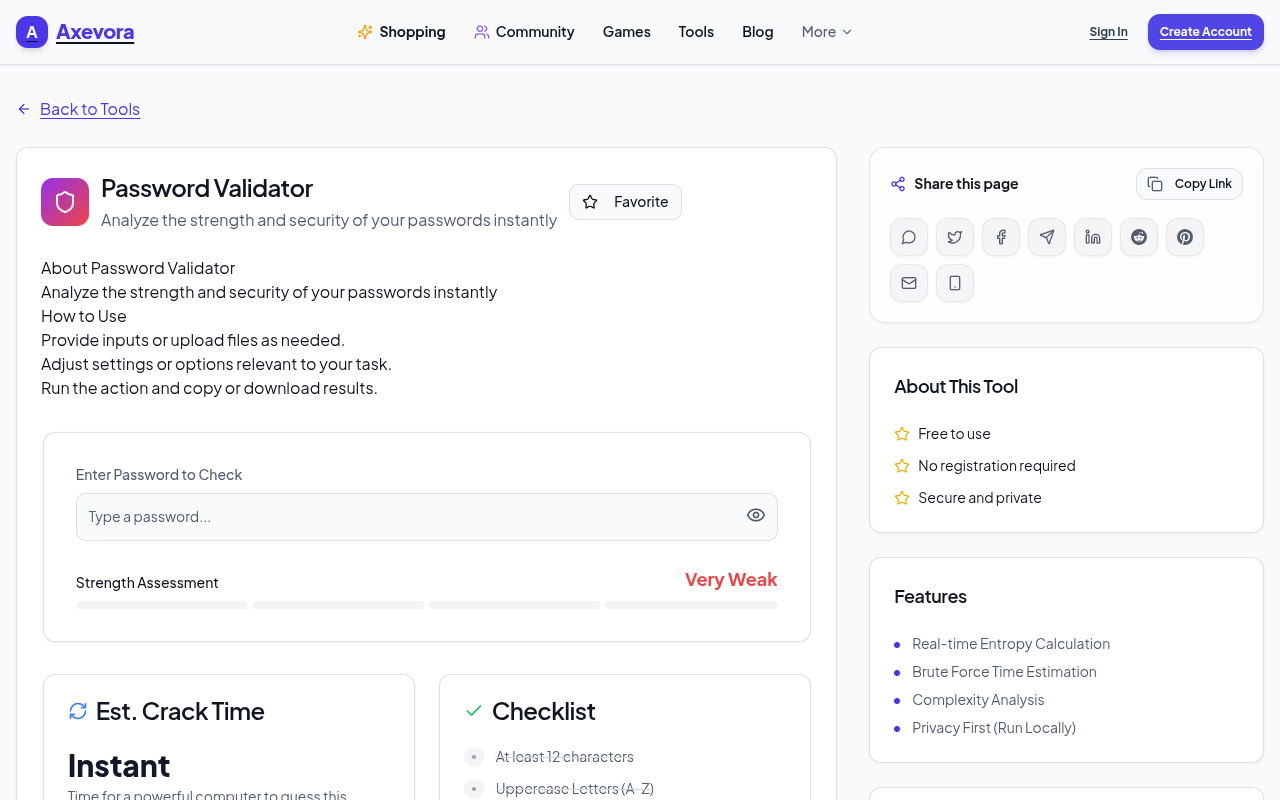
- Entropy score – a statistical measure of unpredictability.
- Complexity breakdown – length, character sets, repetitions, and common patterns.
- Visual strength meter – green to red gradient indicating overall security.
All processing stays local; no data is sent to a server, ensuring privacy.
Who Should Use This Tool
- Students – protect academic accounts and shared project repositories.
- Content creators – secure publishing platforms, cloud storage, and client portals.
- Developers – test API keys, database passwords, and CI/CD tokens.
- Professionals – safeguard corporate VPNs, email, and HR systems.
- Everyday users – any person who wants a quick confidence check before saving a password.
Real‑World Use Cases
1. Rapid audit of legacy passwords
When migrating to a new password manager, paste each old password into the validator to flag weak entries that need updating.
2. Generating secure passwords on the fly
Combine a password generator with the validator to instantly verify that the newly created string meets your organization’s policy.
3. Teaching cybersecurity basics
Instructors can demonstrate how small changes—adding a symbol or increasing length—dramatically boost entropy, using the live tool as a visual aid.
4. Pre‑deployment checks for developers
Before committing configuration files, run service passwords through the validator to ensure they exceed the minimum entropy threshold.
Step‑by‑Step: How to Use the Password Validator
- Open the Password Validator page on Axevora.
- Locate the input box labeled “Enter your password”.
- Type or paste the password you want to evaluate. Do not press Enter.
- Watch the real‑time meter change color and the numeric entropy value appear below.
- Read the detailed breakdown: length, character set usage, repeated patterns, and common dictionary words.
- If the score is low, modify the password (add symbols, increase length, avoid sequences) and watch the meter improve instantly.
- Once satisfied, copy the strong password to your password manager. The tool does not store it.
Key Benefits of Axevora’s Browser‑Based Validator
- Privacy‑first: All calculations happen locally; nothing is transmitted.
- No installation: Works on any modern browser—desktop or mobile.
- Free forever: No hidden fees, sign‑ups, or trial periods.
- Instant feedback: Real‑time meter and detailed analysis guide you as you type.
- Universal compatibility: Works with Windows, macOS, Linux, Chrome, Edge, Firefox, Safari, and even mobile browsers.
Common Mistakes and How to Avoid Them
- Relying solely on length: A long password of only lowercase letters can still be weak. Include mixed case, numbers, and symbols.
- Reusing passwords: The validator only checks strength, not uniqueness. Use a password manager to avoid reuse.
- Copy‑paste from insecure sources: Paste only into the validator, never into untrusted sites.
- Ignoring entropy numbers: Aim for at least 60 bits of entropy for most personal accounts; 80+ for high‑value services.
- Leaving the tool open on public computers: Close the tab after use to prevent shoulder‑surfing.
Practical Examples & Sample Workflows
Example 1 – Updating a corporate VPN password
- Generate a 16‑character random string using a password manager.
- Paste it into the validator.
- See a 78‑bit entropy score and a green meter—ready to apply.
Example 2 – Teaching a class about password hygiene
- Prepare a list of common weak passwords (e.g., “password123”).
- Enter each into the validator live, showing the red meter.
- Modify each by adding symbols and increasing length; watch the meter shift to green.
Frequently Asked Questions (FAQ)
Is my password stored or logged by Axevora?
No. The tool runs entirely client‑side; nothing is transmitted to Axevora’s servers.
What does “entropy” actually measure?
Entropy estimates the number of bits of randomness in a password, reflecting how many guesses an attacker would need on average.
Can I use the validator offline?
Yes. As long as the page has loaded, the JavaScript runs locally, so you can disconnect from the internet and still test passwords.
Does the validator check against known breached passwords?
It focuses on structural strength, not breach databases. For compromised‑password checks, pair this tool with services like “Have I Been Pwned?”
Final Verdict & Call to Action
Axevora’s free Password Validator is a lightweight, privacy‑centric solution that instantly tells you whether a password is strong enough for today’s threats. Whether you’re a student, developer, or everyday user, integrating this quick check into your workflow saves time, reduces risk, and builds better security habits.
Stop guessing and start measuring—your accounts deserve it.
Try the free Password Validator on Axevora →
 50000
 20000
 20
 20
Explore Related TITTOO Coverage & Discussions
- [Category Hub]: Technology & AI Hub
- [Community Forum]: Technology & AI Discussion Forum
- [Related Editorial Story]: JPG to PDF: How to Combine Multiple Images into a Single PDF Online for Free
- [About & Standards]: TITTOO Editorial Standards & Methodology
Discover the fastest way to gauge password security without installing anything. This step‑by‑step guide shows you how to use Axevora’s free Password Validator to protect your accounts today.
Read the full article ↓Discover the fastest way to gauge password security without installing anything. This step‑by‑step guide shows you how to use Axevora’s free Password Validator to protect your accounts today.
Yeh quick view original article ke excerpt par based hai. Puri details ke liye Standard Deep mode padhein.
You are reading the original TITTOO article. Existing article text, links, images, and embedded media are preserved.